Google Clock
Screenshots
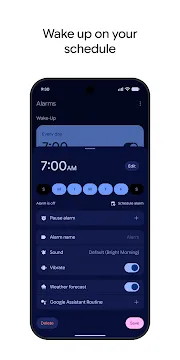
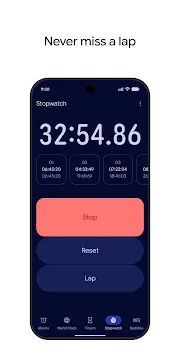
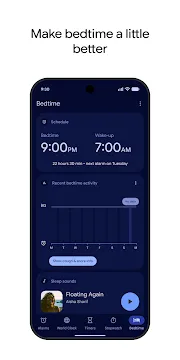
Google Clock is a reliable time management tool designed for mobile users who value simplicity and efficiency. This application comes pre-installed on many devices and provides a clean, clutter-free experience. It helps you manage your daily schedule through alarms, timers, and world clocks. The interface follows modern design principles, making it very easy to navigate. You can set multiple reminders for work, school, or fitness routines. It integrates perfectly with the local ecosystem to provide a seamless experience. Whether you need a loud wake-up call or a quiet countdown for cooking, this tool handles everything with precision.
Exploring the Core Features of Google Clock
The application focuses on four primary functions that cover all your time-related needs. When you open the app, you see a bottom navigation bar with clear icons. This layout allows you to switch between different modes instantly. The Alarm section is the most popular part of the tool. You can create as many alarms as you need for different days of the week.
- Alarms: Customize your wake-up time with specific tones or music.
- World Clock: Check the current time in cities across the globe.
- Timer: Set a countdown for specific tasks or intervals.
- Stopwatch: Track laps and total time for sports or experiments.
Each feature is designed to be accessible with just a few taps. You can name your alarms to keep track of their purpose. For example, you might label one as “Gym Time” and another as “Morning Meeting.” This level of organization ensures that you never feel confused about your schedule.
Customizing Your Alarms in Google Clock
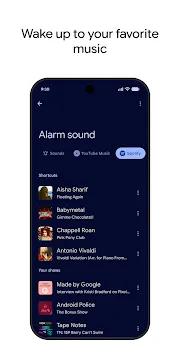
Waking up in the morning is easier when you have the right settings. This application allows you to personalize every detail of your wake-up experience. You can choose from a library of pre-installed ringtones or use your own music files. If you use streaming services, you can even select your favorite songs or playlists as your alarm sound.
- Gradual Volume: Start your day with a soft sound that slowly gets louder.
- Snooze Length: Decide how many minutes you want to wait before the alarm rings again.
- Vibration Patterns: Add a physical alert to ensure you wake up on time.
- Labeling: Give each alert a name to identify it quickly on your screen.
Furthermore, the app includes a “Sunrise Alarm” feature. This option slowly brightens your phone screen before the audio starts. It mimics the natural light of the sun to help you wake up more gently. These small details contribute to a much better morning routine for many users.
Mastering Productivity with Google Clock Timers
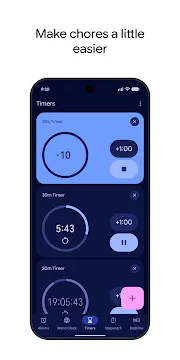
Timers are essential for managing short-term tasks and staying focused throughout the day. The timer function in this application is incredibly flexible and easy to use. You can set multiple timers at once and give each one a unique label. This is very helpful when you are multitasking in the kitchen or following a strict workout circuit.
The interface for setting a timer uses a simple number pad. You enter the hours, minutes, and seconds, then hit the play button. While a timer is running, you can add extra time with a single tap. This prevents you from having to stop and restart the process if you need a few more minutes. Once the time is up, the app sends a clear notification even if you are using another program. It keeps your day moving forward without any unnecessary delays.
Improving Your Sleep with Google Clock Bedtime
Quality rest is just as important as productive work. The application includes a dedicated “Bedtime” section to help you maintain a healthy sleep cycle. You can set a consistent time to go to bed and a time to wake up. The app then shows you how much sleep you will get based on those settings.
- Sleep Sounds: Listen to calming noises like rain or white noise to fall asleep faster.
- Dark Mode: The screen dims and turns grayscale to reduce eye strain before bed.
- Do Not Disturb: Automatically silence notifications during your sleeping hours.
- Sleep Tracking: See a summary of your nighttime habits and consistency over the week.
Using these tools helps you build better habits over time. The application reminds you when it is time to wind down for the night. This prevents you from staying up too late browsing the internet or playing games. By following a steady routine, you feel more energized and focused during the day.
Global Coordination with Google Clock World View
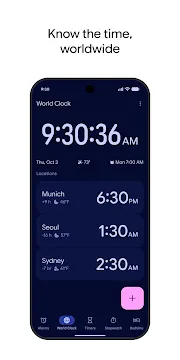
If you work with people in different countries, you know how difficult it is to track time zones. The world clock feature simplifies this process significantly. You can add dozens of cities to your list and see their local time instantly. The app also shows the time difference between your current location and the added city.
When you add a city, the app displays a small map icon to show its location. It also indicates whether the city is currently in its day or night cycle. This visual cue helps you avoid calling someone in the middle of the night. You can rearrange the list of cities to keep the most important ones at the top. This feature is a lifesaver for digital nomads and international business professionals who need to schedule meetings across multiple continents.
Managing the Google Clock Widget and Integration
The application offers several widgets that you can place directly on your home screen. These widgets allow you to see the time or your next alarm without opening the app. You can choose from digital or analog styles to match your phone’s theme. Some widgets even show your stopwatch progress or active timers.
- Analog Clock: A classic look that adds a professional feel to your home screen.
- Digital Clock: A clear and bold display for quick time checks.
- Stacked View: See multiple world clocks in a small, organized space.
- Alarm Info: Always know exactly when your next alert will go off.
The app also integrates with other system tools like the voice assistant. You can set alarms or start timers using just your voice. This is perfect when your hands are busy or when you are away from your phone. This level of connectivity makes the application a central part of your mobile experience.
Conclusion
Google Clock is a simple yet powerful tool that handles all your time management needs effectively. It combines traditional features like alarms and stopwatches with modern additions like bedtime routines and world clocks. The clean interface ensures that anyone can use the app without difficulty. By customizing your settings and using the built-in widgets, you can stay organized and productive throughout the day. It helps you wake up gently, focus on your tasks, and get better sleep at night. This application is an essential part of a balanced daily routine for every user.